
Walkie talkie connector types decide which speaker mics, earpieces and headsets will fit a radio. The most common are 2-pin plugs, including the widely used 2-pin K-type, single-pin jacks on small radios, and multi-pin side or screw-in connectors on professional models. Matching the connector is only the first step: pin wiring, PTT circuits and audio levels must also be compatible. This guide explains the main types and how buyers of radio accessories for walkie talkies can avoid ordering the wrong parts.
Why Connector Type Matters
An accessory connector carries more than audio. Depending on the design, it may carry speaker output, microphone input, PTT signal, ground and sometimes data or power for smart accessories. Two plugs that look similar can be wired differently, so a mic that fits may still produce no audio, poor audio or a stuck transmit.
Wrong accessories are one of the most common after-sales complaints distributors receive. A clear connector reference for each radio model, shared with the sales team and customers, prevents most of these problems. Our walkie talkie accessories supply page lists the accessory families we support.
Common Walkie Talkie Connector Types
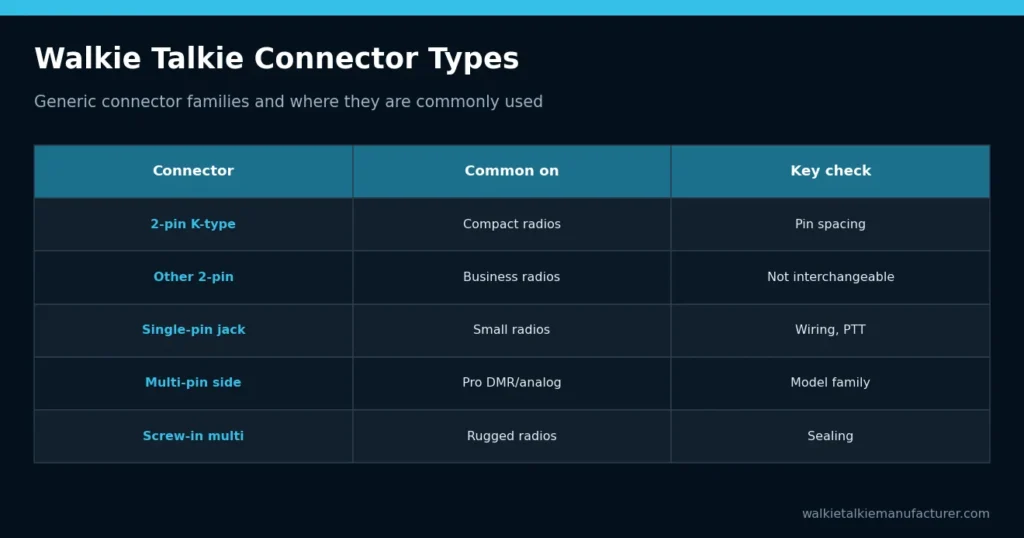
The table uses generic industry descriptions. Exact dimensions, pin spacing and wiring vary, so always confirm with the radio model.
| Connector type | Typical radios | Notes |
|---|---|---|
| 2-pin K-type | Many compact business and entry radios | Two round plugs of different sizes; very widely used layout |
| Other 2-pin layouts | Various business radios | Different spacing or plug angle; not interchangeable with K-type |
| Single-pin (2.5 mm or 3.5 mm) | Consumer and small radios | Often combined mic, speaker and PTT circuits |
| Multi-pin side connector | Professional DMR and analog models | Flat multi-contact interface held by a screw or latch |
| Screw-in multi-pin | Rugged and higher-end radios | Threaded connector, better sealing on some designs |
| USB-C or proprietary ports | Some PoC and newer radios | Check whether audio accessories are supported |
Some radios also accept wireless accessories through Bluetooth, which avoids the connector issue but brings pairing and battery questions.
Identifying an Unknown Connector
If documentation is missing, remove the accessory cover and photograph the connector straight on and from the side, with a ruler for scale. Note the number of plugs or contacts, their diameters, the spacing between them and any screw hole or latch. Send these photos with the radio model label when asking a supplier to confirm compatibility; this avoids guesswork and wrong shipments.
2-Pin Connectors in Detail
Two-pin connectors are the most common on compact handheld radios because they are simple and low cost. The 2-pin K-type layout is popular, and many accessory makers produce compatible speaker mics and earpieces for it. However, not every two-pin radio uses the same layout.
- Check the plug diameters and the distance between the pins
- Check whether the plugs are straight or angled
- Confirm how the PTT circuit is wired
- Make sure the radio’s dust cover can close when no accessory is fitted
Two-pin connections are not usually designed for heavy water exposure. If users work in rain, pay attention to the radio’s protection rating with and without accessories connected.
Multi-Pin and Screw-In Connectors
Professional radios often use multi-pin connectors that support additional functions: programmable accessory buttons, emergency keys on the mic, accessory detection and better audio routing. These connectors are usually secured with a screw or latch, which makes them more robust against being pulled out.
The trade-off is compatibility. Multi-pin designs are frequently specific to a radio family, so accessories may not transfer between models even from the same manufacturer. When a distributor carries several radio families, the accessory catalog grows quickly. Standardizing on one or two connector types across your range simplifies stock.
How to Match Speaker Mics and Earpieces
Follow a simple process whenever you add a radio or accessory to your range.
- Identify the exact radio model and version, not just the brand or series.
- Check the connector type and pin layout in the radio documentation.
- Confirm PTT wiring and any accessory detection requirements.
- Test the accessory on a sample radio: transmit audio, receive audio and PTT.
- Test in the real environment, including noise, movement and weather.
- Record the approved pairing in a compatibility chart.
For noisy sites, the choice of speaker mic matters as much as the connector. See our guide to noise-cancelling speaker microphones for selection tips.
Accessory Types by Connector
Most accessory types are available for common connectors, but options narrow for less common layouts.
| Accessory | What to check | Connector notes |
|---|---|---|
| Remote speaker microphone | Speaker volume, noise reduction, cable strength | Widely available for 2-pin and multi-pin |
| Surveillance earpiece | Acoustic tube or earbud, discreet PTT | Common for 2-pin radios |
| Headset with boom mic | Noise level, hearing protection needs | Often via an adapter cable |
| Throat or bone-conduction mic | Fit, comfort, noise conditions | Availability varies by connector |
| Bluetooth adapter or earpiece | Pairing, battery, range | Radio must support Bluetooth or an adapter |
For wireless options, read our overview of Bluetooth walkie talkies and wireless earpieces.
Adapters and Mixed Fleets
Adapter cables can convert between some connector types, for example to fit a headset to a radio with a different plug. They are useful for mixed fleets but add another point of failure and may not support all functions, such as accessory buttons or emergency keys.
If your customers run several radio models, consider whether standardizing accessories is realistic. Sometimes it is simpler to keep one accessory type per radio family and label stock clearly. Quality matters too: strain relief, cable jacket material and connector retention decide how long an accessory lasts in daily use.
Connector choice is one part of a wider interoperability question. If you also need radios from different makers to talk to each other, read whether different walkie talkie brands can work together.
OEM Accessory Options for Distributors
Distributors often want accessories in their own brand, packaged with radios or sold separately. OEM accessory options can include logo printing, custom cable lengths, packaging and kit bundles such as radio plus speaker mic plus spare battery. Availability depends on the accessory type and connector.
When sourcing, request samples for each connector type you plan to sell and test them with the exact radio versions in your catalog. Keep an approved sample of each so production batches can be compared against it.
It also helps to agree on a labeling scheme with the supplier, such as a connector code printed on each accessory package. Warehouse staff and customers can then match accessories to radios without opening boxes, which reduces picking errors and returns.
What to Send When Requesting a Quote
To receive accurate accessory recommendations, include:
- Radio models and versions, with photos of the connector if unsure
- Accessory types needed: speaker mics, earpieces, headsets, adapters
- Work environment: noise, weather, discreet use, gloves
- Required features such as noise reduction, emergency key or Bluetooth
- Branding and packaging requirements
- Estimated quantities and sample needs
Send your list via our contact page and we will confirm compatibility and suggest suitable accessories.
Related Guides
Need accessories that fit your radios?
Send the radio models you use and the quantities you need. We will match earpieces, speaker mics, batteries, chargers and antennas and quote them together.
Get a Quote →View AccessoriesFrequently Asked Questions
What is a 2-pin K-type connector?
It is a widely used two-plug accessory connector found on many compact business radios, with two round plugs of different sizes at a set spacing. Many third-party speaker mics and earpieces use this layout. Other two-pin radios use different spacing or wiring, so always confirm the radio model before ordering.
Can I use any 2-pin earpiece on my radio?
Not necessarily. Two-pin connectors differ in plug size, pin spacing, angle and PTT wiring. An earpiece that fits physically may still give poor audio or fail to transmit. Check the connector type for your exact radio model and test a sample before buying accessories in volume.
Are multi-pin accessories interchangeable between radios?
Usually only within the same radio family. Multi-pin connectors often carry extra functions, such as programmable buttons or accessory detection, and their layout is specific to the design. Even radios from one manufacturer may use different multi-pin connectors, so check compatibility charts for each model.
Do accessories affect a radio’s water resistance?
They can. A radio’s IP rating usually applies to a specific configuration, often with the accessory cover closed or a sealed connector fitted. Connecting an accessory may change the level of protection. Check what the rating covers and choose sealed connectors for wet environments where available.
Can I get accessories in my own brand?
Many accessory manufacturers offer OEM options, including logo printing, packaging, custom cable lengths and bundled kits. What is available depends on the accessory type, connector and order size. Request samples for each connector type and confirm branding details with the manufacturer before placing a bulk order.
Get a Factory Recommendation & Quote
Tell us your product type, quantity, target country, application, coverage, frequency or network and OEM requirements. We will review suitable options, MOQ factors, estimated lead time and the next sample step.
Prefer a direct conversation? Email lorabanzhitao@gmail.com or message WhatsApp +86 173 1689 5054.